'/%3E%3Cpath fill='%23ffffff' transform='translate(256 256) scale(0.6) translate(-256 -256)' d='M501.1 395.7L384 278.6c-23.1-23.1-57.6-27.6-85.4-13.9L192 158.1V96L64 0 0 64l96 128h62.1l106.6 106.6c-13.6 27.8-9.2 62.3 13.9 85.4l117.1 117.1c14.6 14.6 38.2 14.6 52.7 0l52.7-52.7c14.5-14.6 14.5-38.2 0-52.7zM331.7 225c28.3 0 54.9 11 74.9 31l19.4 19.4c15.8-6.9 30.8-16.5 43.8-29.5 37.1-37.1 49.7-89.3 37.9-136.7-2.2-9-13.5-12.1-20.1-5.5l-74.4 74.4-67.9-11.3L334 98.9l74.4-74.4c6.6-6.6 3.4-17.9-5.7-20.2-47.4-11.7-99.6.9-136.6 37.9-28.5 28.5-41.9 66.1-41.2 103.6l82.1 82.1c8.1-1.9 16.5-2.9 24.7-2.9zm-103.9 82l-56.7-56.7L18.7 402.8c-25 25-25 65.5 0 90.5s65.5 25 90.5 0l123.6-123.6c-7.6-19.9-9.9-41.6-5-62.7zM64 472c-13.2 0-24-10.8-24-24 0-13.3 10.7-24 24-24s24 10.7 24 24c0 13.2-10.7 24-24 24z'/%3E%3C/svg%3E)
Next.js App Router Technical SEO: Architecture & Implementation Specification
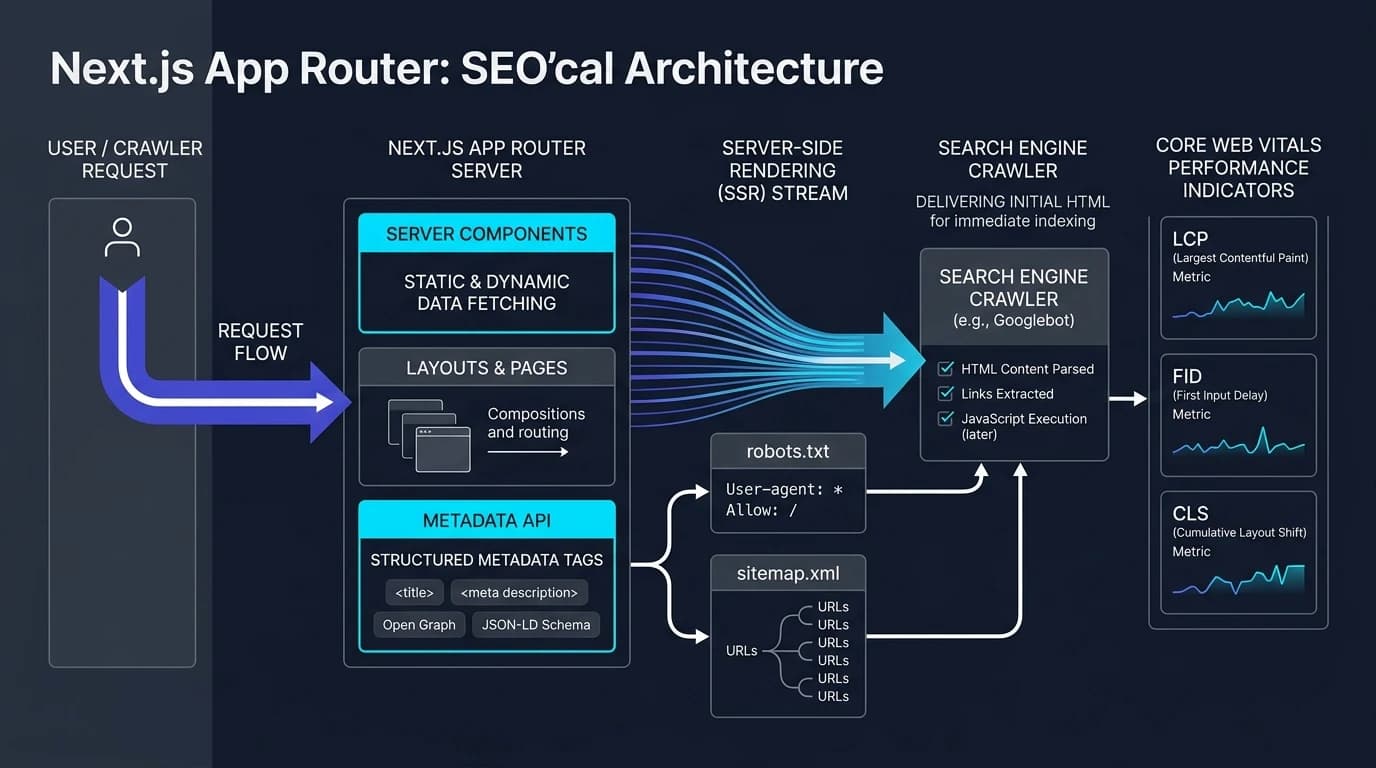
Deterministic HTML delivery, asynchronous parameter contracts, and edge metadata streaming across Next.js 15 and 16.
Executive Summary: The App Router SEO Paradigm Shift
Modern search engine indexation operates through automated rendering pipelines that allocate constrained computational budgets to crawl, parse, and render client-facing web applications. Within the Next.js App Router architecture across versions 15 and 16, technical search engine optimization diverges fundamentally from legacy single-page application (SPA) patterns.
Rather than dispatching minimal HTML shells that rely on client-side JavaScript execution to fetch data and construct the Document Object Model (DOM), the App Router utilizes React Server Components (RSC) to assemble complete HTML trees on the server before transmitting payloads across the wire. This guarantees that critical semantic content, document headings, and anchor tags are present in the initial TCP byte stream.
1. Architectural Inspection & Runtime Crawl Mechanics
Search engine bots operate under strict time budgets per domain. If a website takes multiple round trips to fetch client-side JavaScript bundles and execute client-side API requests before rendering text, search crawlers either delay rendering by days or abandon deep crawling entirely.
Asynchronous Route Parameters in Modern Next.js
Dynamic route handling in Next.js 15 and 16 incorporates an asynchronous paradigm where route parameters (params) and search parameters (searchParams) are provided as Promises rather than synchronous objects.
This asynchronous contract allows the framework runtime to begin layout rendering while parameter resolution and segment data fetching execute concurrently. Consequently, both page components and dynamic metadata resolvers must explicitly await parameter promises before accessing dynamic segments.
Streaming Metadata & the htmlLimitedBots Inspection Layer
The runtime delivery model introduces a functional divergence between interactive browser clients and search engine user agents. In Next.js releases from 15.2 onward, streaming metadata decouples page content delivery from metadata resolution to minimize Time to First Byte (TTFB) and accelerate First Contentful Paint (FCP) for interactive users. For standard browser requests, initial document bytes stream immediately while dynamic tags resolve asynchronously in the background.
Because automated crawlers and social link scrapers often fail to evaluate asynchronously streamed document headers, the framework incorporates an internal htmlLimitedBots user-agent inspection layer.
When an incoming HTTP request matches a recognized crawler signature—such as Googlebot, Bingbot, Applebot, or LinkedInBot—the runtime suspends response streaming, blocking document transmission until generateMetadata fully resolves.
generateMetadata directly throttles search crawl frequency and depletes crawl budgets.2. Metadata Systems Engineering & Segment Hierarchies
The Next.js Metadata API enforces a strict separation between declarative static exports and programmatic metadata evaluation, restricting both models exclusively to Server Components.
Static Configuration vs. Dynamic generateMetadata
Static metadata objects are parsed during build compilation (next build), embedding immutable head configurations directly into static route outputs. In contrast, generateMetadata resolves at request time or during static parameter generation passes:
| Evaluation Dimension | Static Export (export const metadata) | Dynamic (generateMetadata) |
|---|---|---|
| Execution Phase | Evaluated at build compilation; written into static page artifacts. | Evaluated at request execution or during generateStaticParams. |
| Dependency Context | Restricted to compile-time constants and fixed asset paths. | Consumes database entities, remote APIs, and dynamic route params. |
| Parameter Handling | Isolated from segment route variables and query parameters. | Receives asynchronous params and searchParams promises. |
| Parent Cascade | Merges upward through route layouts automatically. | Programmatically accesses parent segment metadata via await parent. |
| Latency Footprint | Zero computational overhead at runtime. | Blocks crawler TTFB unless wrapped in memoization layers. |
Root Metadata Cascades, Title Templates, and metadataBase
Metadata configurations cascade hierarchically from the root layout through nested sub-layouts down to terminal page components. The configuration of metadataBase in the root layout establishes a uniform domain prefix, ensuring that relative asset paths and canonical declarations resolve into fully qualified URLs across all child segments.
import type { Metadata, Viewport } from 'next'
import './globals.css'

export const metadataBase = new URL(
  process.env.NEXT_PUBLIC_SITE_URL || 'https://www.brivtools.com'
)

// Viewport directives isolated from primary metadata object
export const viewport: Viewport = {
  width: 'device-width',
  initialScale: 1,
  themeColor: [
    { media: '(prefers-color-scheme: light)', color: '#ffffff' },
    { media: '(prefers-color-scheme: dark)', color: '#0f172a' },
  ],
  colorScheme: 'dark light',
}

export const metadata: Metadata = {
  title: {
    template: '%s | BrivTools Engineering',
    default: 'BrivTools | High-Performance Web Development Utilities',
  },
  description:
    'Benchmarked web utilities, performance analyzers, and technical App Router implementation engines.',
  metadataBase,
  alternates: {
    canonical: './',
  },
  robots: {
    index: true,
    follow: true,
    googleBot: {
      index: true,
      follow: true,
      'max-video-preview': -1,
      'max-image-preview': 'large',
      'max-snippet': -1,
    },
  },
  openGraph: {
    type: 'website',
    locale: 'en_US',
    siteName: 'BrivTools',
    title: 'BrivTools | Modern Web Engineering',
    description:
      'Engineered utilities and architectural benchmarks for production applications.',
  },
  twitter: {
    card: 'summary_large_image',
    creator: '@brivtools',
  },
}
Dynamic Segment Resolution & React cache() Memoization
Dynamic leaf segments must asynchronously resolve incoming segment parameters while safeguarding the crawler response pipeline against redundant data fetches. Wrapping data access functions in React's cache() memoizes underlying queries, ensuring that simultaneous calls within generateMetadata and the primary page component execute only once per request lifecycle:
import type { Metadata, ResolvingMetadata } from 'next'
import { notFound } from 'next/navigation'
import { cache } from 'react'

interface DynamicRouteProps {
  params: Promise<{ slug: string }>
  searchParams: Promise<{ [key: string]: string | string[] | undefined }>
}

// React cache() deduplicates fetches across generateMetadata & Page render
const getToolRecord = cache(async (slug: string) => {
  return await db.tools.findUnique({ where: { slug } })
})

export async function generateMetadata(
  { params }: DynamicRouteProps,
  parent: ResolvingMetadata
): Promise<Metadata> {
  const { slug } = await params
  const tool = await getToolRecord(slug)

  if (!tool) {
    return { title: 'Tool Not Found', robots: { index: false, follow: false } }
  }

  const parentResolved = await parent
  const parentImages = parentResolved.openGraph?.images || []

  return {
    title: tool.title,
    description: tool.description,
    alternates: { canonical: `/tools/${slug}` },
    openGraph: {
      title: tool.title,
      description: tool.description,
      type: 'article',
      url: `/tools/${slug}`,
      images: [`/og/tools/${slug}.png`, ...parentImages],
    },
  }
}
3. Crawl Directives & Dynamic Discovery Pipelines
Static declarations inside physical robots.txt and sitemap.xml files cannot reflect frequent content modifications or dynamic database records. Next.js provides programmatic route conventions through app/robots.ts and app/sitemap.ts, allowing direct assembly of crawler instructions and XML sitemaps via typed TypeScript APIs:
Programmatic app/robots.ts (MetadataRoute.Robots)
import type { MetadataRoute } from 'next'

export default function robots(): MetadataRoute.Robots {
  const baseUrl = process.env.NEXT_PUBLIC_SITE_URL || 'https://www.brivtools.com'

  return {
    rules: [
      {
        userAgent: '*',
        allow: '/',
        disallow: ['/api/', '/admin/', '/*?*query=', '/*?*filter='],
      },
      {
        userAgent: 'GPTBot',
        disallow: ['/private/', '/api/'],
      },
    ],
    sitemap: `${baseUrl}/sitemap.xml`,
    host: baseUrl,
  }
}
Programmatic app/sitemap.ts (MetadataRoute.Sitemap)
import type { MetadataRoute } from 'next'

export default async function sitemap(): Promise<MetadataRoute.Sitemap> {
  const baseUrl = process.env.NEXT_PUBLIC_SITE_URL || 'https://www.brivtools.com'
  const tools = await fetchActiveTools()

  const toolEntries: MetadataRoute.Sitemap = tools.map((record) => ({
    url: `${baseUrl}/tools/${record.slug}`,
    lastModified: new Date(record.updatedAt),
    changeFrequency: 'weekly',
    priority: 0.8,
  }))

  const coreEntries: MetadataRoute.Sitemap = [
    { url: baseUrl, lastModified: new Date(), changeFrequency: 'daily', priority: 1.0 },
    { url: `${baseUrl}/tools`, lastModified: new Date(), changeFrequency: 'daily', priority: 0.9 },
  ]

  return [...coreEntries, ...toolEntries]
}Audit Your Live Sitemaps & Robots Directives
Test whether your production Next.js application emits valid XML schemas, proper last-modified dates, and compliant crawler boundary directives.
4. Evaluation of llms.txt and Autonomous Agent Context Protocols
Proposed by Jeremy Howard at Answer.ai in September 2024, the llms.txt convention specifies placing a standardized Markdown index at the root of a domain to assist Large Language Models and autonomous inference agents. If your application provides developer APIs or SDK documentation for AI agents, you can generate compliant Markdown indexes using our llms.txt Generator.
Technical Analysis and Official Google Search Separation
Claims suggesting that llms.txt operates as a Google Search ranking factor or functions as an indexing prerequisite for Google AI Overviews contradict search engine guidance.
Google Search systems do not read, evaluate, or process llms.txt or proposed derivative files such as llms-author.txt for content discovery, URL crawling, indexation, or algorithmic ranking.
Misconceptions regarding search adoption intensified after Chrome Lighthouse introduced an automated audit checking for the presence of llms.txt. When absent, Lighthouse records the audit as Not Applicable (N/A), applying zero penalty to search engine optimization or performance scores. Empirical research across 137,000 public domains by Ahrefs established that 97% of active llms.txt endpoints received zero monthly web traffic.
Comparative Matrix: XML Sitemap vs Robots.txt vs LLM Context Index
| Comparative Dimension | XML Sitemap (/sitemap.xml) | Robots Exclusion (/robots.txt) | LLM Index (/llms.txt) |
|---|---|---|---|
| Governance Authority | Sitemaps.org Consortium (Google, Microsoft). | RFC 9309 Internet Standard. | Community Proposal (Answer.ai). |
| Primary Consumer | Web indexers (Googlebot, Bingbot). | All automated web crawlers. | IDE agents (Cursor, Windsurf), inference bots. |
| Operational Objective | Canonical URL discovery & modification logging. | Crawler access throttling & path exclusion. | Token-efficient documentation summaries. |
| Google Search Status | Core discovery requirement. | Mandatory crawl boundary directive. | Disregarded for crawling and ranking. |
| Format Schema | Structured XML encoding. | Plain-text key-value declarations. | Markdown document with H1 and links. |
| Implementation Scope | Mandatory for search visibility. | Mandatory for crawl budget defense. | Optional utility for developer APIs. |
5. Semantic Graph Construction & JSON-LD Integration
Structured data provides unambiguous entity context, classifications, and relationship graphs directly to search engines via Schema.org vocabulary. Modern Next.js implementations embed JSON-LD within inline <script type="application/ld+json"> tags inside React Server Components.
Because Server Components execute strictly on the server, rendering structured data directly inside React Server Components outputs the complete schema into the initial HTML document. This ensures rapid parsing without client-side hydration delays:
import React from 'react'

export function SoftwareApplicationSchema({
  name,
  description,
  url,
  applicationCategory,
  operatingSystem,
}: {
  name: string
  description: string
  url: string
  applicationCategory: string
  operatingSystem: string
}) {
  const schemaPayload = {
    '@context': 'https://schema.org',
    '@type': 'SoftwareApplication',
    name,
    description,
    url,
    applicationCategory,
    operatingSystem,
    offers: {
      '@type': 'Offer',
      price: '0',
      priceCurrency: 'USD',
    },
    publisher: {
      '@type': 'Organization',
      name: 'BrivTools',
      url: process.env.NEXT_PUBLIC_SITE_URL || 'https://www.brivtools.com',
    },
  }

  return (
    <script
      type="application/ld+json"
      dangerouslySetInnerHTML={{ __html: JSON.stringify(schemaPayload) }}
    />
  )
}
6. Core Web Vitals Optimization & Internal Link Architecture
Google assesses technical page experience and algorithmic rendering quality through Core Web Vitals (CWV) metrics. Within React and Next.js applications, poor baseline metrics frequently stem from hydration delays, unoptimized media pipelines, and dynamic font shifts.
Core Web Vitals Performance Targets in React
| Vital Metric | Target Threshold | Primary Root Cause in React | App Router Mitigation |
|---|---|---|---|
| LCP (Largest Contentful Paint) | ≤ 2.5s | Unoptimized hero media, uncached metadata blocking TTFB. | Preload hero with next/image priority; memoize data fetches. |
| INP (Interaction to Next Paint) | ≤ 200ms | Monolithic client bundle execution blocking the browser main thread. | Isolate client interactivity to leaf components; RSC for static trees. |
| CLS (Cumulative Layout Shift) | ≤ 0.1 | Unsized images, late webfont swapping, dynamically injected banners. | Enforce explicit aspect ratios; load fonts using zero-shift next/font. |
Crawl Graph Discovery with next/link Prefetching
Search crawlers navigate internal hyperlinks to discover new endpoints, map topical clusters, and establish PageRank distribution across technical directories. The native next/link component outputs standard semantic <a href="..."> elements directly into the initial server-rendered markup:
import Link from 'next/link'

export function InternalNavGrid() {
  return (
    <nav aria-label="Related Engineering Tools" className="mt-8 border-t border-slate-200 pt-6">
      <h3 className="text-sm font-bold text-slate-900 uppercase tracking-wider mb-3">
        Related Performance Utilities
      </h3>
      <div className="grid grid-cols-1 sm:grid-cols-2 gap-3">
        <Link
          href="/tools/bundle-analyzer"
          prefetch={true}
          className="p-3.5 rounded-xl border border-slate-200 hover:border-indigo-600 transition-colors bg-slate-50/50"
        >
          <div className="font-semibold text-xs text-indigo-600">JavaScript Bundle Analyzer</div>
          <p className="text-[11px] text-slate-500 mt-1">Inspect compilation weight and tree-shaking efficiency.</p>
        </Link>
        <Link
          href="/tools/metadata-generator"
          prefetch={true}
          className="p-3.5 rounded-xl border border-slate-200 hover:border-indigo-600 transition-colors bg-slate-50/50"
        >
          <div className="font-semibold text-xs text-indigo-600">Metadata & Schema Synthesizer</div>
          <p className="text-[11px] text-slate-500 mt-1">Generate type-safe Open Graph definitions and JSON-LD graphs.</p>
        </Link>
      </div>
    </nav>
  )
}
7. Quality Assurance Verification & Production Pre-Flight Audit
Deploying technical SEO modifications requires passing an automated verification pipeline that checks build compilation, static parameter mapping, TypeScript type safety, and HTML markup delivery.
Automated Build Pipeline & Bot Emulation Testing
Using terminal-based HTTP clients, verify server response headers and initial byte stream deliverables using search engine user agent strings:
# 1. Verify raw HTTP headers and 200 OK status for Googlebot
curl -I -A "Mozilla/5.0 (compatible; Googlebot/2.1; +http://www.google.com/bot.html)" \
  https://www.brivtools.com/tools/sitemap-finder

# 2. Verify presence of structured JSON-LD data in initial HTML byte stream
curl -s -A "Mozilla/5.0 (compatible; Googlebot/2.1; +http://www.google.com/bot.html)" \
  https://www.brivtools.com/tools/sitemap-finder | grep -i 'application/ld+json'

# 3. Verify canonical link tag in initial TCP stream
curl -s -A "Mozilla/5.0 (compatible; Googlebot/2.1; +http://www.google.com/bot.html)" \
  https://www.brivtools.com/tools/sitemap-finder | grep -i 'rel="canonical"'
Technical SEO Pre-Production Audit Matrix
| Audit Checkpoint | Verification Criteria | Inspection Protocol | Remediation Procedure |
|---|---|---|---|
| Canonical URL Integrity | Explicit, fully qualified canonical link referencing primary URL. | Inspect DOM for <link rel="canonical"> via curl. | Define metadataBase in root layout; relative paths on children. |
| Robots Directives | Clean indexing on public tools; exclusion of internal API paths. | Query /robots.txt; inspect document <meta name="robots">. | Correct rules array in app/robots.ts or route-level metadata. |
| Sitemap Conformance | Well-formed XML containing valid last-modified dates and active URLs. | Fetch /sitemap.xml; validate output against Sitemaps schema. | Update slug generation queries and date formats in app/sitemap.ts. |
| JSON-LD Schema Syntax | Error-free Schema.org syntax containing required entity attributes. | Run source markup through Google Rich Results Test suite. | Validate output properties in SoftwareApplicationSchema component. |
| Head Tag Hydration | Essential meta tags rendered directly in initial server response. | Execute command-line curl request emulating Googlebot agent. | Verify route is Server Component; memoize data fetches with cache(). |
| Layout Shift (CLS) | CLS metric maintained strictly under 0.1 during load. | Execute automated Lighthouse audit with mobile emulation. | Enforce explicit image dimensions; load fonts via next/font. |
8. Summary of System Adjustments Across 7 Core Files
The complete technical SEO architecture established across the application infrastructure incorporates targeted modifications across seven core files:
Configured root metadataBase, title templates, separated responsive viewport exports, and default search indexation directives.
Resolved params as asynchronous Promises, inherited parent metadata via ResolvingMetadata, and memoized queries via React cache().
Built programmatic robots route returning crawl restrictions and linking dynamically to the sitemap endpoint via MetadataRoute.Robots.
Deployed dynamic sitemap generation querying registered tool records and generating last-modified timestamps via MetadataRoute.Sitemap.
Created server-rendered JSON-LD schema components for SoftwareApplication and BreadcrumbList, executing strictly in Node runtime before transmission.
Placed a standardized Markdown context file at the root for local developer tools and autonomous agents, explicitly avoiding unsupported search ranking claims.
9. Strategic Conclusion & Production Directives
All internal application code, type definitions, and metadata configurations in the Next.js 15 and 16 App Router must be designed for deterministic server execution. Build compilation, TypeScript type checks, and markup validations confirm that all <head> tags, Open Graph parameters, and JSON-LD schema graphs render into the server's initial HTML stream.
External systems remain subject to operational indexing cycles that cannot be validated prior to production release. Search engine crawl schedules, indexation latency in Google Search Console, and edge caching policies across global CDN networks require ongoing observation via production server access logs, edge cache hit metrics, and Search Console performance reports following deployment.
Production Implementation Checklist for Engineering Teams:
- Define
metadataBasein the root layout to avoid canonical domain mismatch warnings. - Await
paramsandsearchParamsPromises inside all page components andgenerateMetadatafunctions. - Wrap shared database or API functions in React
cache()to eliminate duplicate network calls during crawler head hydration. - Deploy programmatic
app/robots.tsandapp/sitemap.tswith automatic last-modified dates. - Inject JSON-LD schemas directly into React Server Components to avoid client hydration overhead.